CSEC Information Technology Paper 1 May/June 2007 - Free CXC Past Paper with Answers
Free CXC Information Technology Paper 1 May/June 2007 past paper from 2007. Includes a worked answer key. Open the PDF, take a timed test, and study with AI on Caribbean AI.
Answer keys are free on Caribbean AI. View the answers to every past-paper question at no cost - no payment needed - with step-by-step worked solutions and instant AI marking available on Premium.
- All CSEC Past Papers
- CSEC Information Technology Past Papers
- CSEC Information Technology Paper 1 May/June 2024
- CSEC Information Technology Paper 1 May/June 2022
- CSEC Information Technology Paper 1 May/June 2021
- CSEC Information Technology Paper 1 May/June 2020
- CSEC Information Technology Paper 1 May/June 2019
- CSEC Information Technology Paper 1 May/June 2018
- CSEC Information Technology Paper 1 May/June 2017
- CSEC Information Technology Paper 1 May/June 2016
- CSEC Information Technology Paper 1 May/June 2015
- CSEC Information Technology Paper 1 May/June 2014
- CSEC Information Technology Paper 1 May/June 2013
- CSEC Information Technology Paper 1 May/June 2012
- CSEC Information Technology Paper 1 May/June 2011
- CSEC Information Technology Paper 1 May/June 2010
- CSEC Information Technology Paper 1 May/June 2009
- CSEC Information Technology Paper 1 May/June 2008
- CSEC Information Technology Paper 1 May/June 2006
- CSEC Information Technology Paper 1 May/June 2005
CSEC Information Technology Paper 1 May/June 2007 - Free CXC Past Paper with Answers
Free CXC Information Technology Paper 1 May/June 2007 past paper from 2007. Includes a worked answer key. Open the PDF, take a timed test, and study with AI on Caribbean AI.
Opening the interactive papers…
- All CSEC Past Papers
- CSEC Information Technology Past Papers
- CSEC Information Technology Paper 1 May/June 2024
- CSEC Information Technology Paper 1 May/June 2022
- CSEC Information Technology Paper 1 May/June 2021
- CSEC Information Technology Paper 1 May/June 2020
- CSEC Information Technology Paper 1 May/June 2019
- CSEC Information Technology Paper 1 May/June 2018
- CSEC Information Technology Paper 1 May/June 2017
- CSEC Information Technology Paper 1 May/June 2016
- CSEC Information Technology Paper 1 May/June 2015
CSEC Information Technology Paper 1 May/June 2007 Questions
Every question from this paper as text. See the answers and worked solutions. Questions are the property of the Caribbean Examinations Council; Caribbean AI is not affiliated with CXC.
- 1.
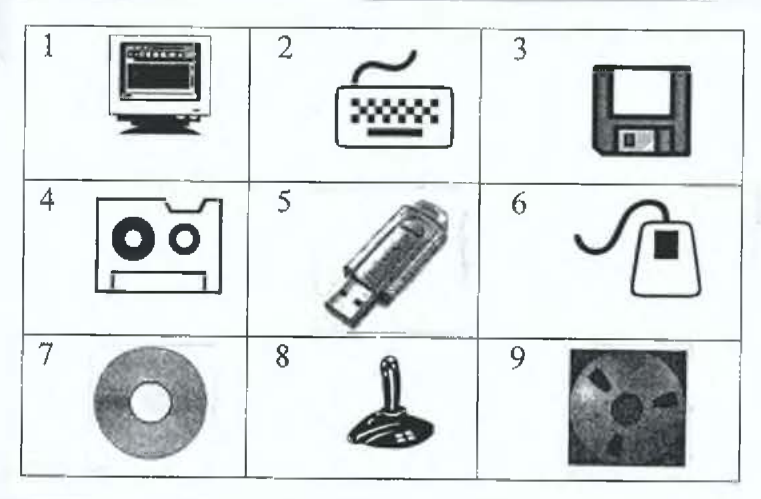
Answer the following questions using the icons in the table below:
(a) Using the number and corresponding name, categorize the above icons into the following groups: (i) Input devices (ii) Output devices (iii) Storage devices (b) Describe ONE common use of icon number 4.
- (A)
Input devices: 1, 2, 4, 6, 8. Output devices: 3, 9. Storage devices: 5, 7.
- (B)
Input devices: 1, 2, 4, 8. Output devices: 3, 6, 9. Storage devices: 5, 7.
- (C)
Input devices: 1, 2, 4, 6, 8. Output devices: 3, 9. Storage devices: 5, 7.
- (D)
Input devices: 1, 2, 4, 8. Output devices: 3, 6, 9. Storage devices: 5, 7.
- (A)
- 2.
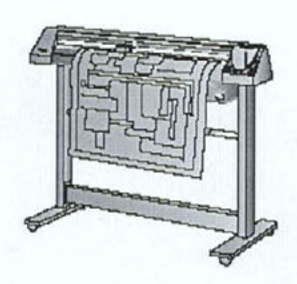
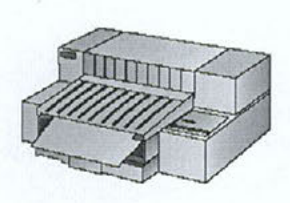
Explain ONE common use of a printer which uses heat on chemically treated paper. State the name of this type of printer.